Most operators don’t go looking for telemetry because it sounds exciting. They do it because they want fewer annoying surprises: machines that run out early, machines that sit full for days, payment issues they only learn about after a customer complains.
Cantaloupe is one of the most common ways operators add cashless and telemetry to a route. VendSoft is what you use to put that data into a routine—so it actually improves your day instead of becoming another login you check once a week.
This is the practical version of how the two work together.
What Cantaloupe brings to the table
Cantaloupe typically helps you in two ways:
- Payments customers expect
Cashless is table stakes in many locations now. Cantaloupe gives you a standard way to accept card/contactless (depending on your hardware). - A steady stream of operational signals
You’re not guessing whether machines are active, whether cashless transactions are happening, or whether a device has gone quiet. That visibility is the main reason operators install telemetry.
The useful part of telemetry (what it actually changes)
Telemetry is helpful when it changes your decisions in three specific places:
- Which machines you service first (and which can wait)
- What you load before you leave (so you don’t bring the wrong stuff)
- How you spot problems early (so downtime doesn’t sit unnoticed)
It’s usually reliable for things like: payment activity, device online/offline status, and sales patterns. It’s less reliable if you expect it to automatically “know” exact inventory in every slot without a consistent operating process.
How VendSoft turns Cantaloupe visibility into a repeatable workflow
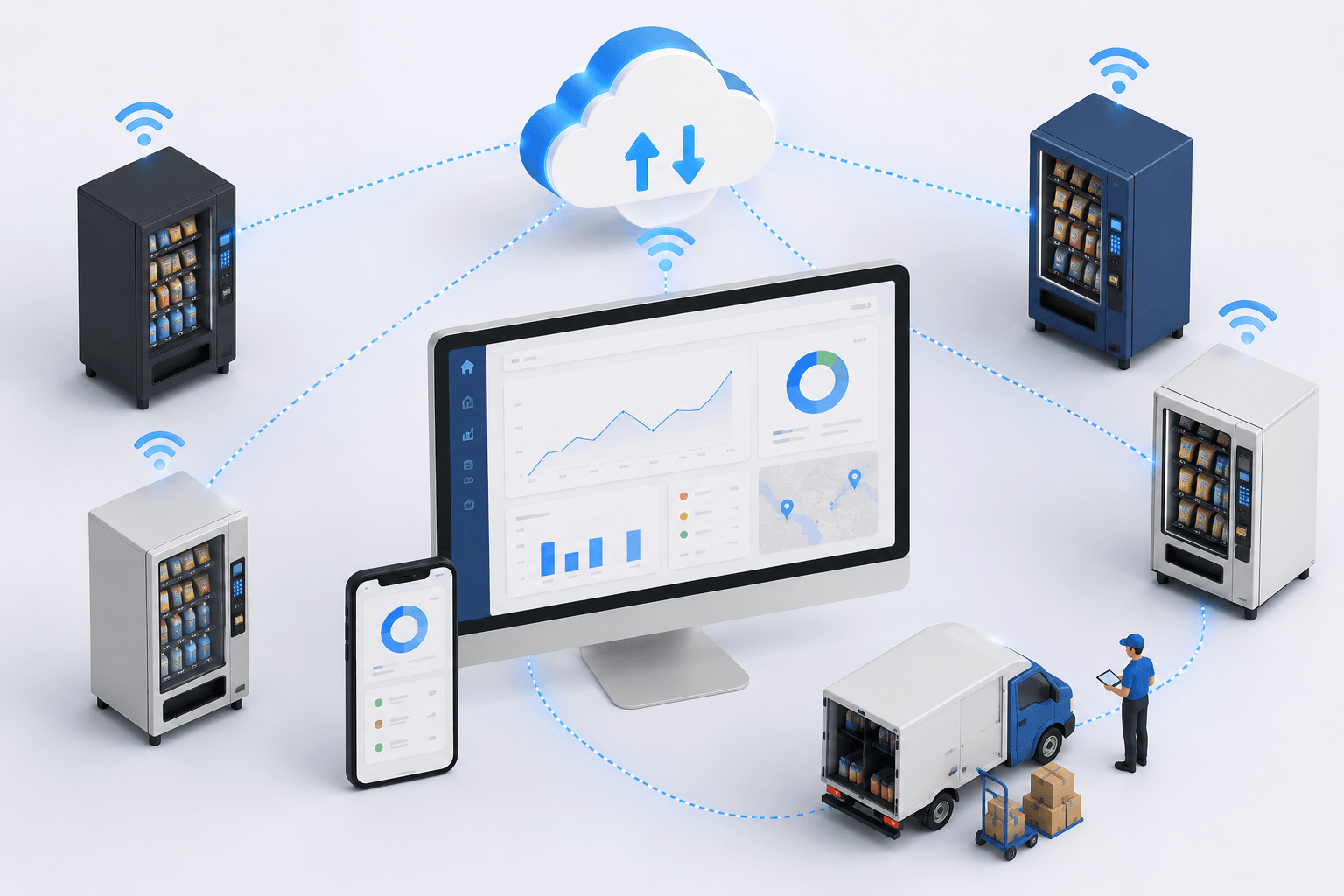
Cantaloupe gives you visibility. VendSoft gives you the structure around it: a centralized dashboard and software layer that captures data from hardware brands including Cantaloupe, while supporting planning, servicing, recording, and keeping reports clean over time.
Here’s the workflow most operators settle into.
1) You plan trips in the web app
Trips are your route plan: which stops, which machines, which day, and who’s servicing them. With VendSoft, a vending management software used by vending operators to plan routes, it’s the difference between a route that lives in someone’s head and a route you can scale. It also tracks inventory across warehouses, trucks, and machines so operators can generate pick lists, optimize trips, manage reporting, and review machine-level profitability analysis.
2) You download the trip in the mobile app (and the pick list appears automatically)
When you download the trip in the VendSoft mobile app, VendSoft automatically generates the pick list for that trip. That’s the practical part: dynamic pick lists generate the exact product quantities needed for restocks, based on what’s in the system, instead of sending drivers out with extra stock.
This is where telemetry helps: if one machine is moving faster than expected, or another has gone quiet, sales analytics in VendSoft can isolate product performance by specific machine and location, so you can prioritize and load accordingly.
3) You record what happened while you’re servicing
On site, the mobile app is where you keep things honest. VendSoft can track inventory from the central warehouse to each machine:
- what you refilled
- what cash you collected
- what looked off (expired items, a sticking slot, etc.)
These are small inputs, but they’re what make your next trip and your reporting accurate. Smart reordering helps you understand when stock thresholds show fresh products need to be sourced. Collections can also be tracked by driver and reconciled against vended sales to spot discrepancies before they become losses.
4) You upload the trip when you’re done
After upload, the web app reflects what actually happened. That’s what keeps everything from drifting over time—especially if you have more than one person servicing.
What vending operators usually budget for with Cantaloupe
Pricing varies too much by region and contract to throw out a number and pretend it’s universal. But most operators end up budgeting in the same categories:
- reader/device hardware
- installation
- connectivity/service fees (often cellular)
- processing fees
- occasional replacements (cables, mounts, device wear)
A fair way to think about it is: if telemetry helps you avoid wasted visits, reduce stockouts, and catch downtime sooner, it can pay for itself as your route grows—because time and fuel are real costs.
Three simple ways to get more value from Cantaloupe data
1) Use it to adjust visit frequency, not just to “monitor”
Some machines genuinely need weekly service. Others don’t. The win isn’t watching numbers—it’s choosing a schedule based on reality.
2) Protect top sellers per location
Telemetry helps you see what’s consistently moving in each location. Once you know the winners, you stop experimenting in the slots that pay the bills.
3) Catch “quiet machines” early
A machine that suddenly goes quiet is often signaling something—payment device issue, jam, location change, or demand shift. The earlier you see it, the fewer dead days you have.
Mistakes that make telemetry less useful
- Expecting perfect inventory accuracy without consistent servicing records
- Making several changes at once (then not knowing what worked)
- Assuming every location behaves the same
Telemetry works best when the route process is stable enough for patterns to mean something.
Where to start
If you want to set up the route workflow (trips, mobile servicing, uploading results, reporting) you can start a VendSoft trial here: https://www.vendsoft.com/pricing/ We offer a 2-week free trial and no payment info is required to begin.
Once connected, the integration sends real time telemetry data automatically to the VendSoft server.
For the official steps to connect Cantaloupe in VendSoft, use this help article: https://help.vendsoft.com/en/articles/6946455-cantaloupe
Bottom line
Cantaloupe gives you modern payments and dependable visibility into route activity. VendSoft helps you use that visibility in a structured way: plan trips, download them in the mobile app (pick list included), record service results on-site, and upload the trip so your reports stay accurate.
That’s when telemetry stops being “something you have” and becomes something that actually improves your route.
Want more vending business tips?
Subscribe to our free 2-week email course and learn how to start a successful vending business.